OpenRouter
- What it is and what FilmOpen uses it for
- Pricing
- FilmOpen credit
- Create your own key
- The plugin
- If something goes wrong
Implemented in plugin fo-openrouter.
What it is and what FilmOpen uses it for
Section titled “What it is and what FilmOpen uses it for”OpenRouter sells many makers’ language models through one account, one balance and one key. FilmOpen uses it for writing and for turning text into structured data. Its model list in the assistant’s settings names what you can choose, DeepSeek and Kimi models among them.
| Model | Made by | What it does in FilmOpen |
|---|---|---|
| Claude Opus 5 | Anthropic | Writes prose, scenes, dialogue and scripts from your instructions and the story so far |
| GPT-5.6 Sol | OpenAI | Writes, like Claude Opus 5 |
| Gemini 3.1 Pro | Writes, like Claude Opus 5 | |
| Claude Sonnet 5 | Anthropic | Reads text and returns structured data, such as the characters in a synopsis |
| GPT-5.6 Terra | OpenAI | Returns structured data, like Claude Sonnet 5 |
| Gemini 3.8 Flash | Returns structured data, like Claude Sonnet 5 |
The technical notes cover OpenRouter’s API in more depth.
Pricing
Section titled “Pricing”OpenRouter is prepaid: you buy credits, and each request’s cost comes off your balance.
- Buying credits. A purchase is between $5 and $25,000 (terms, §4.1). Paying by card adds a fee of 5.5%, at least $0.80; paying in crypto adds 5% (FAQ).
- Refunds. You can ask for unused credits back within 24 hours of a purchase; after that they can’t be refunded. The fee is never refunded, and neither is a crypto payment (terms, §4.1).
- Expiry. OpenRouter may expire credits still unused 365 days after you bought them (terms, §4.2).
- Tax. OpenRouter’s pages don’t say whether tax is added.
Prices per million tokens, input / output, for ordinary prompts:
| Model | OpenRouter | From its maker |
|---|---|---|
| Claude Opus 5 | $5 / $25 | Anthropic: $5 / $25 |
| Claude Sonnet 5 | $2 / $10 | Anthropic: $2 / $10 |
| GPT-5.6 Sol | $2 / $10, marked 50% off | OpenAI: $4 / $20 |
| GPT-5.6 Terra | $2 / $12 | OpenAI: $2 / $12 |
| Gemini 3.1 Pro | $2 / $12 | Google: $2 / $12 |
| Gemini 3.8 Flash | $0.75 / $3.75, marked 50% off | Google: $0.75 / $3.75 until 31 December 2026, then $1.50 / $7.50 |
- Discounts. OpenRouter marks GPT-5.6 Sol and Gemini 3.8 Flash 50% off, with no end date (discounted models).
- Providers. Several providers serve each model, and OpenRouter picks one for each request, weighing price and skipping any that are down (provider selection). The table gives the price of each model’s maker’s own service. Others can charge much more: GPT-5.6 Sol costs $4.40 / $22 on Amazon Bedrock and up to $5.50 / $33 on Azure, without the discount; Gemini’s priority service costs 1.8 times as much, and Claude Opus 5’s fast service twice as much (as OpenRouter lists each model’s providers, such as GPT-5.6 Sol’s).
- Long prompts cost more: from 272,000 input tokens, GPT-5.6 Sol costs $4 / $15 and GPT-5.6 Terra $4 / $18; above 200,000, Gemini 3.1 Pro costs $4 / $18.
OpenRouter’s prices were checked on 15 September 2026 and match FilmOpen’s catalogue of 9 November 2026, the makers’ on 14 September 2026. See OpenRouter’s models for today’s.
FilmOpen credit
Section titled “FilmOpen credit”You can use FilmOpen credit instead of your own OpenRouter key: FilmOpen can write and read text through OpenRouter on your balance.
Top up your FilmOpen account on filmopen.ai. FilmOpen passes on OpenRouter’s actual rate and charges 8% plus the payment processor’s fees when you top up.
With no OpenRouter key of your own saved, the plugin’s page says Ready on FilmOpen credit. once you are signed in and have a balance; Sign in to filmopen.ai to use FilmOpen credit. or FilmOpen credit: top up on filmopen.ai. say what is missing. A key of your own wins: once you save one, FilmOpen uses it and OpenRouter bills you directly.
Create your own key
Section titled “Create your own key”These steps open an OpenRouter account of your own and put its key into FilmOpen. The screenshots of OpenRouter were taken on its site on 15 September 2026, while an account was opened with Google. Adding credits and making further keys follow OpenRouter’s documentation, without screenshots.
Before you start
Section titled “Before you start”You need:
- a GitHub, Google or MetaMask account, or an e-mail address and a password, as OpenRouter’s sign-up page offered on 15 September 2026;
- to be at least 18 (terms, §2);
- a card, AliPay or USDC, to buy credits (FAQ).
OpenRouter’s pages don’t mention a phone check, an identity check or two-factor sign-in, and they give no list of countries. Some model providers don’t let people in certain countries or regions use their models (terms, §5.7).
Create an account
Section titled “Create an account”-
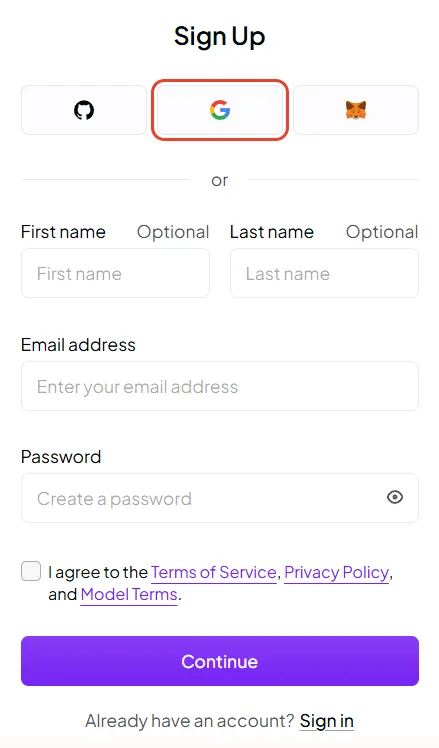
Open OpenRouter’s sign-up page. Press one of the three logo buttons at the top, for GitHub, Google or MetaMask, or type your e-mail address and a password; your first and last name are optional.
-
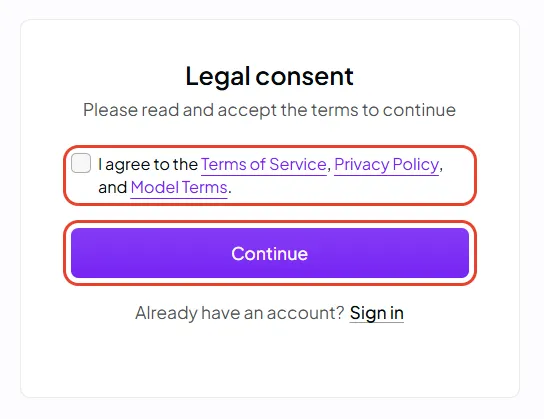
Tick I agree to the Terms of Service, Privacy Policy, and Model Terms and press Continue. Signing up with Google, this came afterwards, on a page of its own, Legal consent.
-
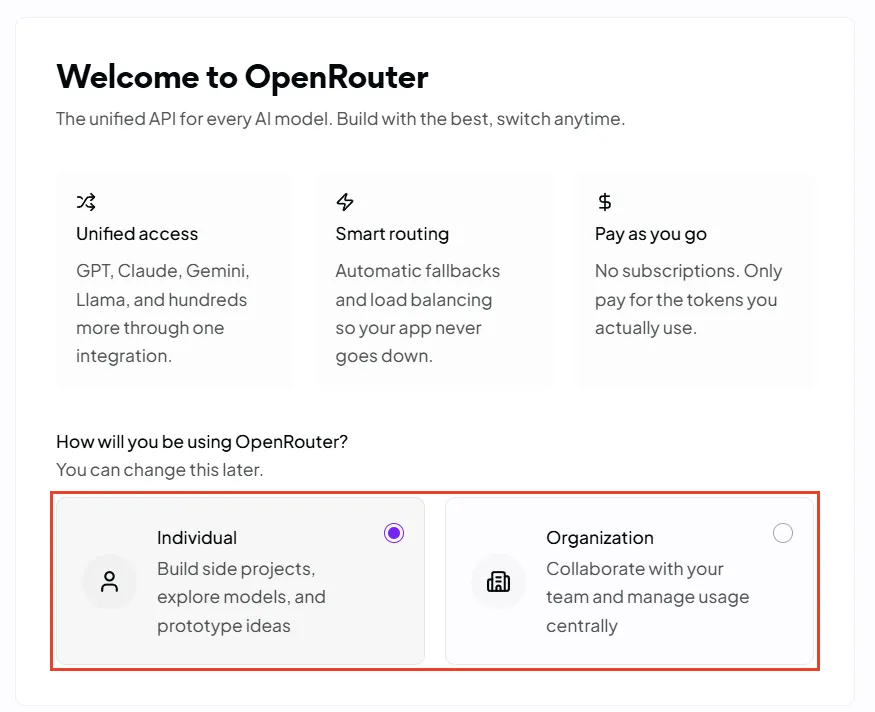
Welcome to OpenRouter asks how you will use it. Choose Individual, or Organization if a team will share the account; you can change this later. Press Next, at the bottom right.
-
The next welcome step shows your first API key: see Create a key before you move on from it.
Protect the account. OpenRouter’s pages don’t mention two-factor sign-in, so if you sign in with GitHub or Google, turn it on for that account.
Add money
Section titled “Add money”A later welcome step asks for your card and how much credit to buy. You can buy more at any time on OpenRouter’s credits page (organisations).
- The amount: between $5 and $25,000 a purchase, plus the card fee of 5.5%, at least $0.80 (see Pricing).
- Automatic top-up is optional. When you buy credits you can have OpenRouter charge your card again whenever your balance falls below a threshold you set. Leave it off unless you want that (terms, §4.2).
- Changed your mind? Ask for a refund of unused credits within 24 hours (terms, §4.1).
- When credits run out, OpenRouter refuses requests once your balance falls below zero (limits).
Create a key
Section titled “Create a key”-
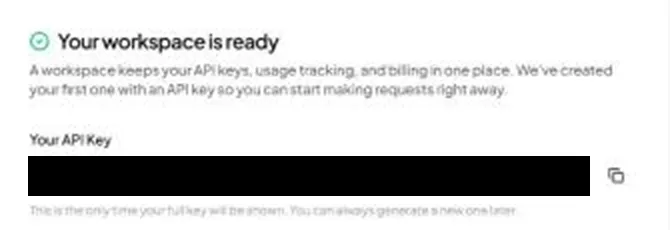
Your first key comes with your account. The welcome step Your workspace is ready shows an API key OpenRouter has made for you, and shows it in full only this once. Press the copy button beside it, and keep the key somewhere safe, such as a password manager, until you add it to FilmOpen.
-
A key with a spending limit. On OpenRouter’s API keys page you can create more keys, each with a name and, if you like, a credit limit (authentication). A key that has spent its limit is refused (limits). A key just for FilmOpen, with a limit, caps what FilmOpen can spend; delete any key you don’t use.
The key starts sk-or-v1-.
Add the key to FilmOpen
Section titled “Add the key to FilmOpen”FilmOpen keeps your key on this device, encrypted in your operating system’s credential store, for your user only. It never puts the key in a project or in its log, never shows it again apart from its last four characters, and sends it only to OpenRouter. Plugins run in FilmOpen’s desktop app, so add the key there.
- In FilmOpen, open Settings, choose Plugins, and press Configure on the OpenRouter row. If it isn’t turned on yet, install and allow it first.
- On the OpenRouter key card, paste your key into the API key box and press Save. FilmOpen asks OpenRouter about the key before it saves anything, and the card says so while it waits. OpenRouter’s keys start with
sk-or-v1-: if what you pasted doesn’t, or it looks like another platform’s key, a line under the box says so and Save asks first. - A green Key was accepted appears under the box, the box empties, and the card says Verified on the date, with the key’s last four characters. FilmOpen saves no key OpenRouter did not accept.
If the card says something else:
- Key is invalid: OpenRouter refused the key, so nothing was saved and the box keeps it. Check that you copied all of it, or create a new key.
- Could not check: OpenRouter didn’t answer in time, couldn’t be reached, or answered with an error. Nothing was saved, and the box keeps the key: press Save again when the connection is back.
- Saving this key could not be confirmed: the box keeps the key. Press Save to try again, and if it keeps happening, restart FilmOpen.
Save checks the key with OpenRouter before it stores anything, without running a model. Remove takes the key out of FilmOpen after asking, and the key keeps working on OpenRouter until you delete it there.
After pasting a key anywhere, clear your clipboard history if your system keeps one: on Windows, press Win+V and choose Clear all.
Keep the key safe
Section titled “Keep the key safe”- Anyone with your key can spend your credits. Never put the key in a chat, an e-mail, a shared document or code.
- Give it a credit limit, so a leaked key can spend only so much (see Create a key).
- If it may have leaked, delete it on the API keys page and create a new one. OpenRouter also looks for its keys in public code on GitHub and e-mails you when it finds one (authentication).
- Protect the account. If you sign in with GitHub or Google, turn on that account’s two-factor sign-in; with an e-mail address, choose a password you use nowhere else.
The plugin
Section titled “The plugin”fo-openrouter gives FilmOpen OpenRouter’s language models. Turn the plugin on in Settings → Plugins; Installing plugins explains installing and allowing one. Its page is opened with Configure on its row, and Check under Can it work? asks the platform about your key without making anything.
What it does. The plugin sends your request to the model you chose in the assistant’s settings and brings the words back as they are written. Assistants that use tools can call them too. A request runs once and is never repeated by itself, so a lost answer may still have been charged: check your OpenRouter activity before trying again.
Cost. FilmOpen records the cost OpenRouter reports for each request in Usage. Where OpenRouter reports none, the cost is shown as unknown, never as zero.
A valid key does not guarantee access to every model, or that credit remains.
If something goes wrong
Section titled “If something goes wrong”- You moved on without copying the first key: OpenRouter shows a key in full only once. Create a new one on the API keys page, and delete the one you didn’t copy.
- Requests are refused for credits: your balance has fallen below zero, or the key has spent its credit limit (limits). Add credits, or raise the key’s limit.
- FilmOpen says the key is invalid, or that it could not check it: nothing was saved and the box keeps the key, so you can put it right and press Save again — see Add the key to FilmOpen for what each line means.